Doctible Team
January 22, 2026
•
5
min read

Getting more chiropractic patients is not just about posting more often or running another ad. Most practices lose opportunities in the same few areas:
Marketing for chiropractors works best when several parts of the patient journey support one another: local search visibility helps people find the practice, reviews and a clear website build trust, fast follow-up converts interest into appointments, and ongoing communication helps patients return and refer others.
For most chiropractic practices, the highest-priority areas are local SEO, Google Business Profile optimization, online reviews, website conversion, lead follow-up, patient reactivation, and referral generation. Paid advertising and social media can then expand reach once those foundations are working consistently.
Before you work through all 65 ideas, focus on the areas that most affect new patient growth.
Once those foundations are in place, use the full list below to build a stronger marketing system over time.
If you want a shorter list of tactics to prioritize first, see these chiropractic marketing strategies for attracting more patients.
Growing a chiropractic practice today means combining great patient care with smart, consistent marketing across a variety of channels. Often, the best place to start in chiropractic marketing is where you already engage with new patients: your website and front desk.
Explore the ideas below to get started right away in strengthening your online presence, increasing engagement, and driving growth for your practice.
Your Google Business Profile is one of the most important visibility tools for a local chiropractic practice. Make sure your primary category, services, hours, photos, business description, appointment link, and contact details are complete and accurate.
Google also allows local businesses to display links that help customers take action, such as making an appointment, directly from the Business Profile. That makes your profile more than a listing. It can become a booking path.
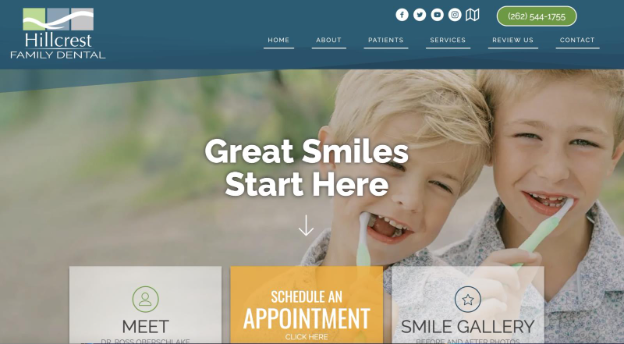
Don't make patients hunt for the next step. Add a clear appointment link or CTA on your homepage, service pages, Google Business Profile, social profiles, paid ad landing pages, and email signature.
Use direct language, such as “Request an Appointment” or “Book a Visit,” instead of vague CTAs like “Learn More.”
The practice that responds first often wins the patient.
If someone fills out a form, calls after hours, or leaves a voicemail, they may also be contacting other chiropractors nearby.
Use a chiropractic patient engagement system that captures every inquiry and follows up promptly, so new patient opportunities don't depend entirely on front-desk availability.
Marketing works better when your team can keep up with the demand it creates. Automate repetitive communication for appointment reminders, review requests, recall, reactivation, missed-call follow-up, and post-visit messages.
This helps your team stay consistent without having to manually track every patient touchpoint.
Before spending more money on traffic, make sure your website can turn visitors into appointments. Your homepage should quickly explain who you help, what you treat, where you are located, and how to book.
Every key page should include a visible CTA, phone number, trust signals, and simple navigation.
Reviews help patients decide whether they trust your practice. Ask happy patients for reviews as part of a consistent post-visit workflow.
Don't leave review generation to memory. Use a compliant, repeatable process that makes it easy for patients to share feedback.
Responding to reviews shows that your practice is active, attentive, and patient-focused. Keep responses brief and professional.
Avoid confirming that someone is a patient or sharing treatment details. A safe response might say, “Thank you for your feedback. We appreciate you taking the time to share your experience.”
If your practice serves a specific city, neighborhood, or nearby area, your website should make that clear. Build pages around important services and locations, such as “Chiropractor in [City]” or “Back Pain Chiropractor in [City].”
Keep the content useful and specific. Don't create thin duplicate pages for every nearby town.
Your homepage should not only say that you provide chiropractic care. It should tell patients why they should choose your practice.
Lead with clear patient outcomes, such as faster access, personalized care, help for specific pain concerns, or convenient appointment options.
Don't judge marketing only by clicks or traffic. Track the actions that matter: phone calls, form fills, appointment requests, booked visits, and new patient sources.
Use Google Analytics, Google Search Console, call tracking, and your practice management workflows to understand what is actually driving growth.
For a deeper step-by-step approach to websites, local search, content, and reviews, see our guide to online chiropractic marketing.
Your title tags and meta descriptions influence how your pages appear in search results. Use clear, local, patient-focused language.
For example: “Chiropractor in [City] for Back Pain, Neck Pain & Wellness Care.”
Many patients search for care from their phones. Your site should load quickly, be easy to read, and make it simple to call or request an appointment on mobile.
If a patient has to pinch, zoom, or dig for your phone number, the page is not doing its job.
Create an FAQ page or add FAQs to key service pages. Answer questions patients actually ask, such as:
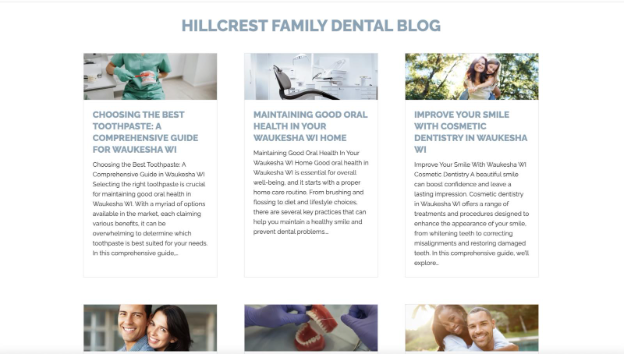
Blog content should answer real patient questions, not just target keywords. Focus on practical topics related to back pain, neck pain, headaches, posture, workplace ergonomics, sports injuries, auto accident care, and first-visit expectations.
Good content helps patients understand when to seek care and why your practice may be a good fit.
Don't rely on one general “Services” page. Build clear pages for your most important services or patient needs, such as back pain, neck pain, sciatica, headaches, prenatal chiropractic, sports chiropractic, auto injury care, or wellness care.
Each page should explain symptoms, treatment approach, what to expect, and how to schedule.
Patients make quick judgments. Near the top of your homepage, include trust signals such as review rating, years in practice, insurance accepted, same-week availability, convenient location, or a short patient-centered value statement.
Don't overload the page. Choose the signals that matter most.
Real photos help patients feel more comfortable before visiting. Add current photos of your exterior, front desk, treatment rooms, doctor, and care team.
Avoid relying only on stock images. Patients want to know what the actual practice feels like.
A simple office tour video can reduce uncertainty for new patients. Show where to park, where to check in, what the treatment rooms look like, and what patients can expect during their first visit.
Keep it short and friendly.
.jpg)
A short video from the chiropractor can help patients build trust before they book. The video should explain who you help, your care philosophy, and what a new patient can expect.
Keep it natural. A polished but stiff video is less effective than a clear, approachable one.
Testimonials can build trust, but healthcare practices need to be careful with privacy and claims. Use written or video testimonials only with proper permission, and avoid implying guaranteed results.
FTC guidance says health-related advertising claims should be truthful, not misleading, and supported by appropriate evidence.
Google Search Console can show which search queries are already bringing impressions and clicks to your site. Use that data to improve pages that rank but don't earn enough clicks or appointments.
Look for terms related to local chiropractic care, symptoms, services, and insurance questions.
A sitemap helps search engines discover important pages on your website. Submit it through Google Search Console and keep it current as you add or remove pages.
This is a basic but important technical SEO step.
A slow website can hurt user experience and make patients leave before they contact you. Compress images, reduce unnecessary scripts, and make sure key pages load quickly on mobile.
This matters most on your homepage, service pages, and appointment pages.
Structured data can help search engines better understand your practice information. Add appropriate local business or medical business schema with your name, address, phone number, hours, and website.
This should support your local SEO foundation, not replace useful content.
Your practice name, address, and phone number should be consistent across your website, Google Business Profile, directories, social pages, and major citation sources.
Inconsistent information can confuse both patients and search engines.
Some of your best opportunities are already in your patient database. Send thoughtful reactivation messages to patients who have not scheduled in several months.
Keep the message simple: remind them that your team is available, make scheduling easy, and avoid pressure.
Missed appointments hurt the schedule. Use automated reminders by text, email, or phone based on patient communication preferences.
Make it easy for patients to confirm, cancel, or request a new time.

A new patient’s first visit is a key moment. Send a short follow-up message thanking them for coming in and reminding them how to reach the office with questions.
This can improve the patient experience and support retention.
Use recall messages to bring patients back when they are due for care, follow-up, or a recommended check-in. The goal is to make it easy for patients to return before they disappear from the schedule.
An email list helps you stay connected with patients and prospective patients. Use it for practical education, office updates, seasonal reminders, and reactivation.
Keep emails brief and useful. Most patients will skim.
A newsletter can keep your practice top of mind. Share short tips, office updates, appointment reminders, seasonal topics, and links to helpful website content.
Avoid making every newsletter a promotion.
Patients often prefer quick, convenient communication. Two-way texting can help with scheduling, reminders, simple questions, and follow-up.
Make sure texting workflows follow your compliance policies and patient communication preferences.
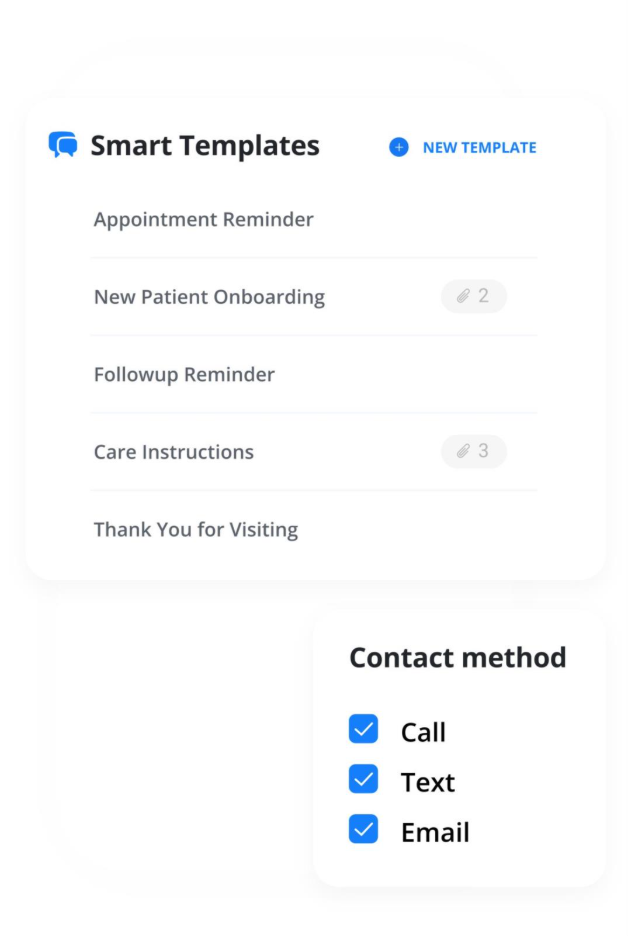
Front desk teams answer the same questions repeatedly. Create approved templates for insurance questions, first-visit instructions, appointment reminders, directions, cancellation policies, and post-visit follow-up.
Templates save time and help the patient experience stay consistent.
Use patient feedback surveys to identify issues before they become public reviews. Ask about scheduling, wait times, communication, office experience, and overall satisfaction.
Use the feedback to improve operations, not just marketing.
Happy patients are often willing to refer friends or family, but they may need a reminder. Create a simple, professional referral request process that makes sharing your practice easy.
Avoid anything that could look like improper inducement. Follow applicable state rules and professional guidance.
Google Ads can work well when patients are actively searching for a chiropractor nearby. Focus on high-intent terms, strong location targeting, clear ad copy, and landing pages built for conversion.
Track calls and appointment requests so you know what is working.
Don't send every ad to the homepage. Create landing pages that match the ad’s message, such as back pain care, auto injury care, or new patient appointments.
The page should include a clear headline, trust signals, location, phone number, and appointment CTA.
For urgent needs, call-focused ads can help patients reach your office quickly. But they only work if someone can answer or if missed calls receive immediate follow-up.
Don't pay for ads for calls your practice cannot handle.
Facebook and Instagram ads can help promote specific services, office updates, events, or educational content. They are usually better for awareness and retargeting than urgent search demand.
Use clear, compliant messaging and avoid exaggerated health claims.
Retargeting ads can remind previous website visitors to come back and schedule. Keep messaging simple and helpful.
This works best when your website already has meaningful traffic.
New patient offers can attract attention, but they should be compliant, ethical, and financially sound. Avoid offers that attract only price-shopping patients or create unrealistic expectations.
Check state board rules and legal guidance before using discounts or incentives.
Instead of advertising “chiropractic care” broadly, test campaigns around specific patient needs, such as back pain, neck pain, sciatica, sports injury, or auto accident care.
Specific ads usually match patient intent better.
UTM parameters help you identify which campaigns, newsletters, ads, or partner placements drive traffic and conversions.
Use them consistently so you can compare performance across channels.
Don't let paid campaigns run on autopilot. Review search terms, cost per lead, conversion rate, call quality, and booked appointments monthly.
Pause wasteful campaigns and invest more in what produces real patients.
Local businesses can become strong referral partners. Reach out to gyms, yoga studios, massage therapists, physical therapy clinics, personal trainers, athletic clubs, and wellness-focused businesses.
Focus on education and relationship-building, not aggressive sales.
Offer short educational talks for local businesses on topics like posture, desk ergonomics, back pain prevention, stretching, or workplace wellness.
Make the talk useful even if attendees never become patients.
Sponsoring a local team, school event, charity event, 5K, or community organization can build awareness. Choose groups that match your patient base and values.
Make sure your practice name, website, and appointment path are visible.
Local business groups can help you build referral relationships and community recognition. The value usually comes from showing up consistently, not just having your name on a member list.
Health fairs and community events can introduce your practice to local residents. Bring simple educational materials, answer questions, and make it easy for interested people to schedule later.
Many chiropractic patients deal with desk-related neck, back, and shoulder issues. Offer local employers a short ergonomics session for their team.
This creates value and gives people a natural reason to learn about your practice.
Build a list of complementary local providers and businesses. This may include massage therapists, trainers, medical providers, wellness centers, and attorneys for auto injury cases where appropriate.
Keep the relationship professional and patient-centered.
Referral cards can still work when they are simple and easy to share. Give them to happy patients, local partners, and event attendees.
Include your website, phone number, location, and a clear reason to contact the practice.
Patient appreciation events can strengthen retention and word-of-mouth. Keep them simple: refreshments, small giveaways, family-friendly themes, or educational mini-sessions.
The goal is to deepen relationships, not create a complicated event your team dreads.
Tie campaigns to seasonal needs, such as back-to-school posture, winter slips and falls, spring sports, golf season, gardening injuries, holiday travel, or desk ergonomics.
Seasonal campaigns give you a reason to update emails, social posts, and website content.
Short videos can help patients understand common conditions and care options. Cover simple topics like “When to see a chiropractor for neck pain” or “What to expect at your first visit.”
Post them on your website, YouTube, Google Business Profile, Facebook, Instagram, and email newsletters when appropriate.
YouTube can support trust and search visibility. Create videos around frequently asked questions, office tours, patient education, and condition-specific topics.
Keep titles clear and searchable.
Social media should support trust and familiarity, not just fill a calendar. Share office updates, practical tips, team introductions, patient education, community involvement, and short videos.
Consistency matters more than posting every day.
LinkedIn can be useful for connecting with local employers, HR leaders, attorneys, trainers, and business owners. Share professional content about workplace wellness, ergonomics, injury prevention, and practice updates.
This is usually better for referral relationships than direct patient acquisition.
Don't only publish new content. Review older blog posts and update outdated advice, weak intros, missing CTAs, internal links, and service mentions.
This can improve both SEO performance and user engagement.
A single topic can become a blog, short video, email, social post, FAQ, and patient handout. This saves time and keeps messaging consistent across channels.
For example, “What to expect at your first chiropractic visit” can support several marketing channels.
Simple downloadable guides can help patients learn and give your practice a useful lead-generation asset. Examples include a back pain checklist, desk ergonomics guide, auto injury visit checklist, or first-visit guide.
Keep the content practical and easy to read.
Create content that connects your services to your community. Examples include “Best desk setup tips for [City] office workers” or “How [City] runners can reduce injury risk.”
Local relevance can make content more useful and more differentiated.
Directories still matter for accuracy and local presence, but they should not be your main marketing strategy. Focus first on Google Business Profile, your website, major healthcare directories, and consistent contact information.
Billboards, newspaper ads, radio, and TV can build awareness in some markets, but they are harder to track and usually require consistent investment.
Use them only when you have a clear message, strong local reach, and a way to measure response.
Platforms like Groupon or aggressive discount campaigns may create short-term appointment volume, but they can attract price-sensitive patients who don't convert into long-term care.
Use discounting carefully, and make sure it supports your practice goals, compliance obligations, and patient experience.
You don't need to tackle all 65 chiropractic marketing ideas at once. Start with the areas most likely to affect patient growth: local visibility, website conversion, patient follow-up, and front desk efficiency.
Use this simple 5-day plan to find quick wins and build momentum.
Start with your Google Business Profile. Make sure your practice name, address, phone number, hours, website, appointment link, services, and photos are accurate.
Then search for your practice the way a patient would. Try terms like “chiropractor near me,” “back pain chiropractor in [city],” and “neck pain chiropractor in [city].”
Ask yourself:
Open your website on a phone and look at it from a patient’s perspective.
Can someone quickly tell what you treat, where you are located, and how to schedule? Is your phone number easy to tap? Is there a clear appointment button near the top of the page?
If the next step is not obvious, fix that before spending more money on traffic.
Review missed calls, voicemails, website forms, chat messages, and appointment requests from the past 30 days.
Look for patterns. Are inquiries coming in after hours? Are forms sitting too long before someone responds? Are missed calls being returned quickly?
Every unanswered inquiry is a potential patient who may keep searching.
Choose a simple process for asking happy patients to leave a review. The best review strategy is consistent, easy for the patient, and respectful of privacy.
You can also use patient feedback surveys to identify where the experience can be improved before small issues become public complaints.
Pick one repetitive task that takes time away from your front desk. Start with appointment reminders, recall messages, review requests, missed-call follow-ups, or new-patient follow-ups.
Automation does not replace your team. It helps your team stay consistent when the office is busy.
If your chiropractic marketing is getting clicks but not enough booked appointments, your website and follow-up process may be part of the problem.
Doctible’s free website audit helps identify where your practice may be losing patient opportunities online, from unclear calls to action and weak trust signals to missed conversion opportunities.
A better website should do more than look polished. It should help patients understand your practice, trust your team, and take the next step.

DeBusk, C. (2018, April 5). Is Groupon a good idea for chiropractors? Chiropractic Economics. https://www.chiroeco.com/groupon-for-chiropractors/
Learn about sitemaps. (2025, December 10). Google Search Central; Google. https://developers.google.com/search/docs/crawling-indexing/sitemaps/overview
Stand out on Google with a free Business Profile. (2026). Google Business Profile. https://business.google.com/us/business-profile/?ppsrc=GPDA2

If you want the best digital patient engagement and marketing platform, you need Doctible.